
How Do You Fill an Open Home Care Shift in Under an Hour?
Offer the shift to the client's backup first, then to nearby qualified caregivers under 40 hours, all at once, with time, area, tasks and pay in the message.
By Caregiver Scheduling Team ·
Offer the shift first to the client’s trained backup, then to qualified caregivers who are nearby and under 40 hours this week, all at once rather than one call at a time. Put the time, area, tasks and pay in the message, and confirm the first qualified person who accepts. Preparation does most of the work: a backup for every client, preferences on file and weekly hours you can see.
Who do you offer the shift to first?
The person the client already knows, then outward by familiarity and distance. Each step down the list costs you more time and the client more comfort.
- The client’s backup caregiver. Already introduced, already knows the home. See how many caregivers per client.
- Caregivers who have served this client before. Check the visit history, not memory.
- Nearby caregivers under 40 hours who match the client’s recorded preferences. See caregiver and client matching.
- Floaters who cover several areas and expect short-notice work.
- Office staff qualified to give care, as a last resort.
Send steps 1 and 2 at the same moment. If nobody accepts in 15 minutes, send step 3 as a group offer.
What should the offer include?
Everything a caregiver needs to say yes without calling you back. A vague offer gets ignored.
| Detail | Example |
|---|---|
| Time | Today 2 to 6 p.m. |
| Area | Near Elm St and 5th, not the full address |
| Tasks | Personal care, lunch, light housekeeping |
| Client notes | Uses a walker, has a cat, prefers female caregiver |
| Pay | Regular rate plus $25 short-notice bonus |
| How to accept | Tap accept in the app, or reply YES |
Leave the client’s name and address out of any ordinary text message. Send them to the person who accepts, through a secure channel. See HIPAA for non-medical home care.
Should you pay a short-notice bonus, and does it count toward overtime?
Many agencies do, and yes, it counts. A bonus you announce in advance to get caregivers to pick up shifts is a nondiscretionary bonus. Under the Fair Labor Standards Act it must be included in the regular rate used to calculate overtime (29 CFR 778.211). The Department of Labor’s Fact Sheet 56C lists attendance bonuses and bonuses promised to encourage work as examples.
The adjustment is small but required. A caregiver at the national median wage for home health and personal care aides, $17.21 an hour in 2025, works 44 hours and earns a $25 pickup bonus:
| Step | Math | Result |
|---|---|---|
| Straight-time pay | 44 x $17.21 + $25 | $782.24 |
| Regular rate | $782.24 / 44 | $17.78 |
| Overtime premium | 4 x $17.78 x 0.5 | $35.56 |
| Total for the week | $817.80 |
Skipping the bonus in the regular rate underpays this caregiver by about $1.14. Across a year of pickups and a wage claim, that adds up. See home care overtime rules.
How do you avoid creating overtime when you fill a shift?
Check the caregiver’s hours for the whole workweek before you offer, including travel. Overtime is counted per fixed 168-hour workweek (29 CFR 778.105), and hours with every client add up. Drive time between clients during the day is hours worked too (29 CFR 785.38).
Sometimes overtime is the right call. A four-hour shift at time-and-a-half costs about $34 extra at the median wage, which beats a missed visit. Make it a choice you see, not a surprise at payroll.
What should you set up in advance?
Four things, all before the first call-out of the week.
- A trained backup for every client, introduced during a regular visit.
- Client preferences recorded: gender, pets, smoking, language, lifting.
- Weekly hours visible for every caregiver, including travel.
- One way to offer a shift to many caregivers at once, with a record of who accepted.
Write the expectations down as well. A call-out policy and a no-call no-show policy cut the number of open shifts you have to fill.
What should you track?
Two numbers, by day of week: minutes from call-out to confirmed, and the share of open shifts filled.
| Measure | Target | Why |
|---|---|---|
| Time to fill | Under 60 minutes | Shows whether the offer process works |
| Fill rate | Over 95 percent | Each miss is a lost visit and a worried family |
| Open shifts per week | Falling | Points back to retention and the call-out policy |
| Who fills them | Spread out | One hero caregiver burns out and quits |
Mondays and the day after a holiday usually need extra planning. See home care holiday staffing.
How Caregiver Scheduling handles this
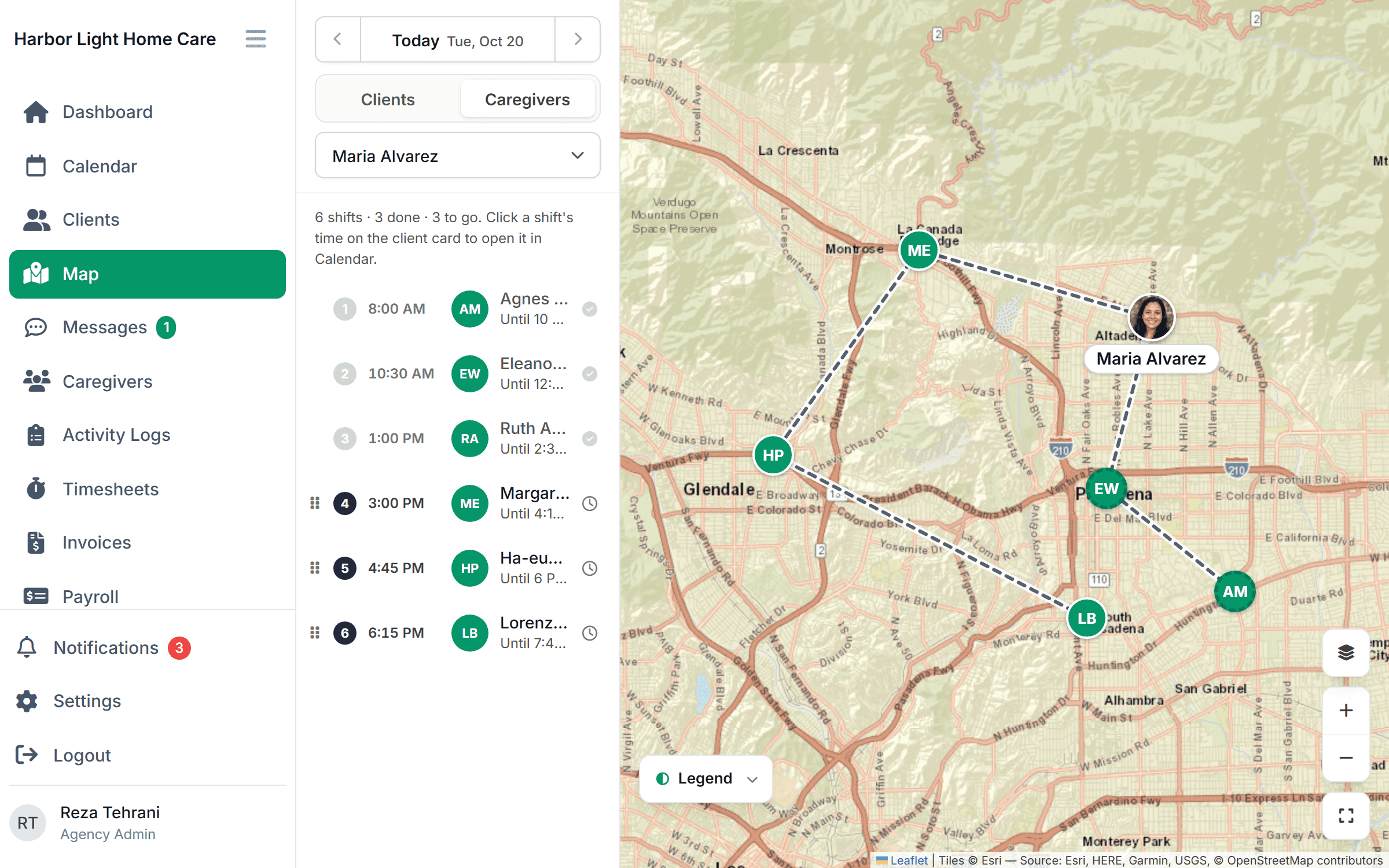
Open shifts appear on a map beside the caregivers working in that area. Assign the closest one who’s cleared for the client, or post it so cleared caregivers get the offer in the app and accept it with one tap. On Growth and up, credentials are checked before the assignment is made. Drag the visit to the new caregiver and their route updates. Verified check-in confirms the visit happened. $199/month for up to 10 caregivers or $299/month for up to 50, free for 30 days.
FAQ
Should I pay a bonus for short-notice shifts? Many agencies do. Announce the amount in advance, pay it every time you promise it, and include it in the regular rate for overtime.
Is texting a list of caregivers okay? For the offer, yes, if it leaves out the client’s name and address. Send the details to the person who accepts through a secure app.
What if nobody accepts? Call the client early, offer a shorter visit or a different time, and send a floater or qualified office staff. Record the miss and review it that week.
This article is general information, not legal advice. Check your state’s overtime and bonus rules.