
How to Schedule Caregivers: A System for Small Agencies
Schedule recurring visits first, then backups, geography and a 40-hour check, then post open shifts. A repeatable weekly process with the overtime math.
By Caregiver Scheduling Team ·
Schedule caregivers in a fixed order: recurring visits first, matched by client fit and geography, then a named backup for every client, then a check of each caregiver’s weekly hours against 40, then open shifts posted for the gaps. Lock the schedule a few days before the week starts and handle changes through one person or one system.
What does the weekly process look like?
Eight steps, most of them done once and repeated. The two that take real time each week are the hours check and the open shifts.
| Step | When | What to do |
|---|---|---|
| 1. Recurring visits | Ongoing | Every client’s standing schedule is entered once and repeats |
| 2. Match | When a client starts | Assign a primary caregiver by fit: skills, preferences, language, gender preference, location |
| 3. Backup | First 2 weeks of service | Introduce a second caregiver who covers a regular shift |
| 4. Geography | Weekly | Keep each caregiver’s clients in one area; order the day to cut drive time |
| 5. Hours check | 3 to 4 days before the week | Total visit and travel hours per caregiver; move visits off anyone over 40 |
| 6. Open shifts | Same time | Post unfilled visits for qualified nearby caregivers to accept |
| 7. Confirm | 1 to 2 days before | Caregivers confirm their week; families get the caregiver’s name |
| 8. Same-day changes | Daily | Call-outs go through the coverage process |
See recurring caregiver schedules for step 1.
What matters most when matching caregivers to clients?
Consistency. Clients and families care most about seeing the same one or two faces. After that: personality, the specific care tasks, language, gender preference for personal care, pets or smoking in the home, and whether the caregiver drives. Write these on the client record so whoever covers a call-out can see them without calling you.
Why is geography a scheduling decision?
Because drive time between clients is paid time. Under the FLSA, travel from one client’s home to the next during the workday is hours worked (29 CFR 785.38). A caregiver crossing town twice a day costs you wages and mileage for the drive, counts toward the 40-hour overtime line, and arrives late.
Group clients by area, give each caregiver a home zone, and fill call-outs from the same zone first. See caregiver route planning and travel time pay.
How do you keep caregivers under 40 hours?
Total every caregiver’s visit and travel hours for the workweek before the week starts, and move visits off anyone over 40. Two federal rules shape this.
First, the workweek is a fixed, regularly recurring period of 168 hours. It can start on any day and hour, but once set it stays fixed (29 CFR 778.105). Second, each workweek stands alone. A caregiver who works 30 hours one week and 50 the next is owed 10 hours of overtime, even though the average is 40 (29 CFR 778.104).
Here is what that looks like at the national median caregiver wage of $17.21 an hour (BLS, May 2025):
| Scheduled week | Visit hours | Travel hours | Total | Overtime hours | Extra cost |
|---|---|---|---|---|---|
| Planned at 36 visit hours | 36 | 3 | 39 | 0 | $0 |
| Planned at 40 visit hours | 40 | 3 | 43 | 3 | $25.82 |
| One extra 4-hour fill | 40 | 4 | 48 | 8 | $68.84 |
The extra cost is the half-time premium of $8.61 on each hour over 40. Across 20 caregivers, 5 unplanned overtime hours each is about $860 a week. Plan full-time caregivers at 30 to 36 visit hours so travel and one call-out fill fit under 40. Run your own numbers in the overtime calculator and see home care overtime rules.
How do you handle same-day call-outs?
With a written process that anyone in the office can follow. Log the call-out, call the client’s named backup, post the shift as open to nearby qualified caregivers, update the family, and escalate to the owner after 30 minutes without coverage. Fill from the same zone first, and check the covering caregiver’s weekly total before confirming. See call-out policy and how to fill open shifts.
When has your system outgrown paper?
When you rebuild the schedule after every change. Four signs:
- You rebuild the spreadsheet after every call-out.
- Caregivers call the office to ask where to go next.
- Overtime shows up on payroll day, not on the schedule.
- You can’t tell who is nearest to an open visit.
See scheduling with spreadsheets.
How Caregiver Scheduling handles this
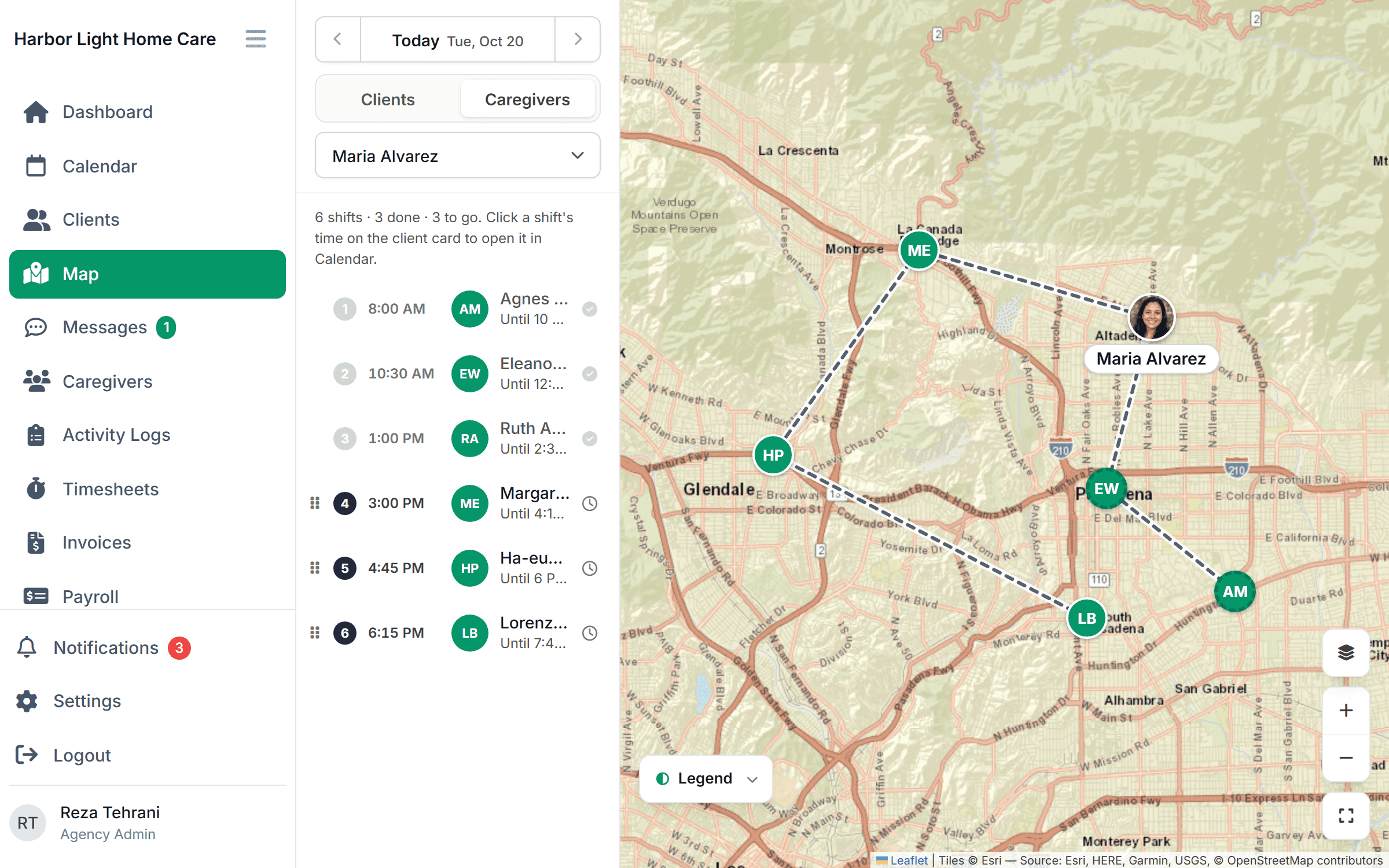
Recurring schedules fill the calendar. Drag a visit to another time or caregiver and their route updates. Every client and caregiver is on one map, with open shifts shown for quick fills, and caregivers accept shifts in the app. Preferred caregivers are assigned by default, conflicts are checked as you drop a visit, and on Growth and up so are credentials and authorized hours. $199/month for up to 10 caregivers or $299/month for up to 50, free for 30 days.
FAQ
How far ahead should I schedule caregivers? Keep recurring visits set indefinitely and confirm each week 3 to 4 days ahead.
Should caregivers pick their own shifts? Let them accept open shifts, but keep regular clients assigned for consistency.
Can I average hours over two weeks to avoid overtime? No. Each workweek stands alone under the FLSA, so 30 hours one week and 50 the next means 10 overtime hours.
How many clients can one scheduler manage? It depends on visit length and churn. Short visits and frequent changes need more scheduling time per client.
This article is general information, not legal advice. Check your state’s overtime rules, since some states also require daily overtime.